What is usability testing, and how do you run one?
Usability testing means watching real people try to do real tasks with your product while they say what they’re thinking. You don’t ask whether they like it. You watch where they get stuck. For most product teams, a round of five users finds most of the big problems. Write three to five realistic tasks, run 30-minute sessions over a video call, stay quiet while they work, then log every problem with a timestamp. Fix the worst ones and test again. AI can help you plan and sort your notes. It can’t replace the people.
Series: UX Research Methods, from the textbook to real work. This is #1.
On this page
- Where usability testing came from
- The textbook version vs. what teams actually do
- Why five users is usually enough
- How to run a test in five steps
- Where AI helps, and where it doesn’t
- Copy-and-paste prompts
- Example (fictional)
- Limits
- FAQ
Where did usability testing come from?
If you took an HCI or UX course, you probably met usability testing next to one name: Jakob Nielsen. He described the think-aloud method in his 1993 book Usability Engineering, and in 2012 he still called it “the single most valuable usability engineering method.” The idea is simple. People use the product and narrate their thoughts as they go, so you hear the confusion, not just see it.
Nielsen Norman Group defines usability testing as a method where a facilitator asks a participant to do tasks, then watches what they do and listens to what they say (NN/g). Three parts make it work: a facilitator, realistic tasks, and a participant who matches your real users.
The textbook version vs. what teams actually do
In class, usability testing often looks like a lab: a trained facilitator, a quiet room, tasks read the same way each time. At work, it usually looks like a product manager or designer on a video call with a screen share, squeezing five sessions into two days.
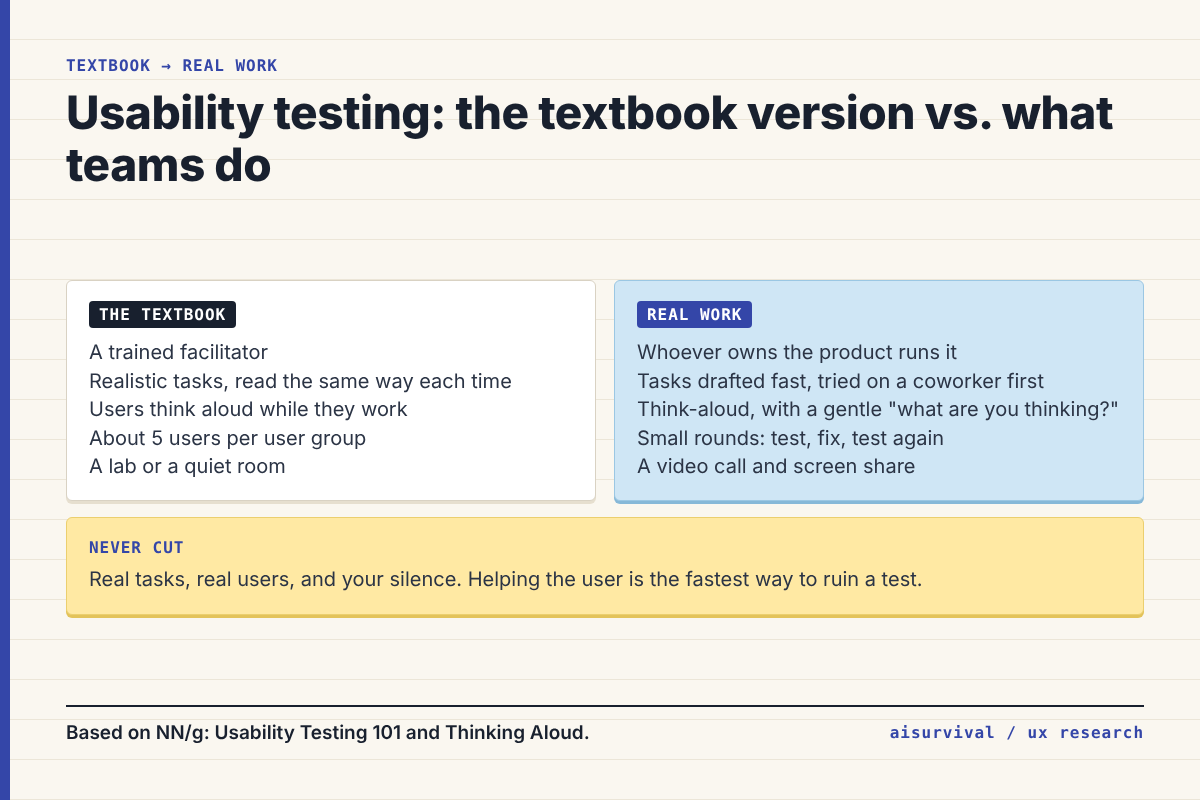
That’s fine. Most of the lab setup can go. Three things can’t: tasks that match real life, participants who match real users, and a facilitator who stays quiet. The moment you start helping (“try the menu up top”), you’re not testing the product anymore. You’re testing your hints.
Large company: a UX researcher runs it, often with a recruiting panel, consent forms, and a stakeholder viewing room.
Small team: the person who owns the product runs it, recruits from customers or a mailing list, and shares short clips with the team afterward.
Why is five users usually enough?
This comes from a famous 2000 article by Nielsen, “Why You Only Need to Test with 5 Users.” His model says the share of problems you find with n users is 1 − (1 − L)n, where L is the share one user finds. With his typical L of 31%, five users find about 85% of the problems, and each user after that mostly repeats what you’ve already seen.
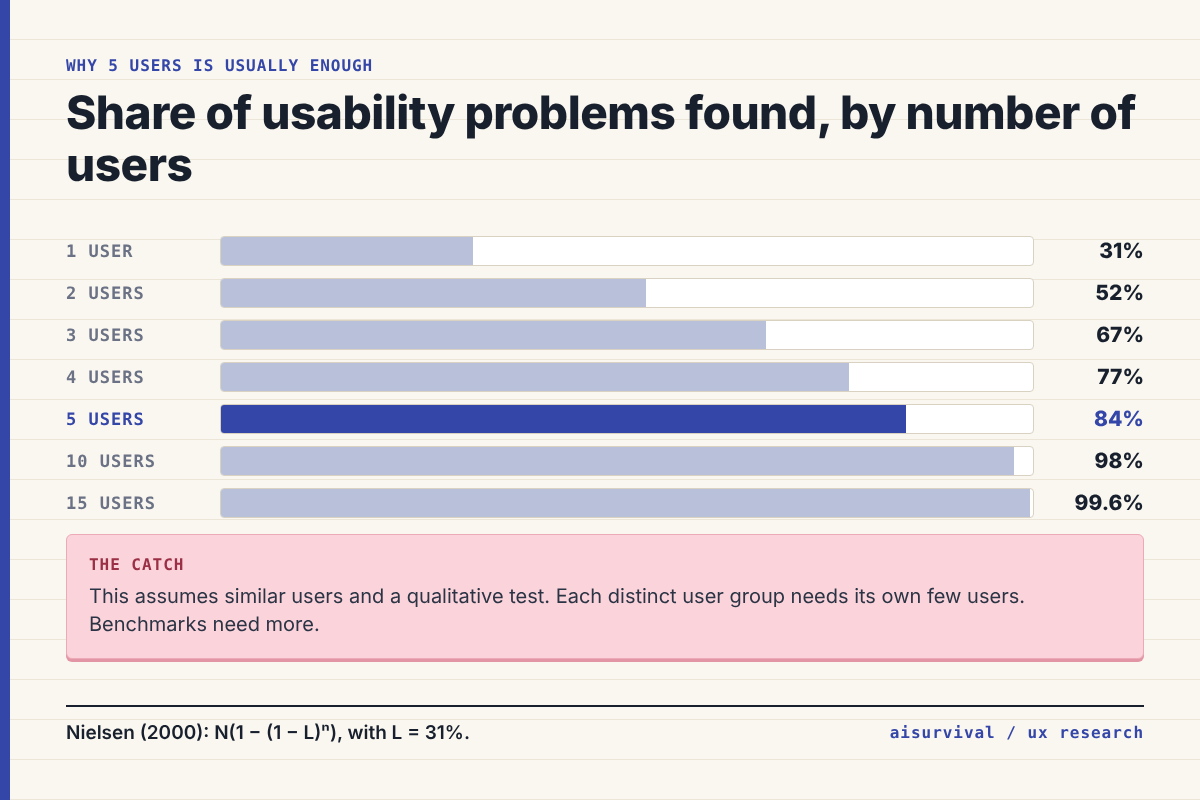
The part people forget? His real advice was to split the budget. Instead of one test with 15 users, run three tests with five each, fixing problems in between (NN/g). And five isn’t a magic number for everything. It assumes your users are similar and your test is qualitative. If you have very different user groups, each group needs its own few users. If you want numbers like task success rates to benchmark, you need more people.
How do you run a usability test in five steps?
- Pick the decision. What will you change based on this test? “Should we redesign the download page?” is a decision. “Learn about users” isn’t.
- Recruit five people who match your users. Customers, newsletter readers, or people who fit a short screener. Coworkers are fine for a dry run, not for the real test.
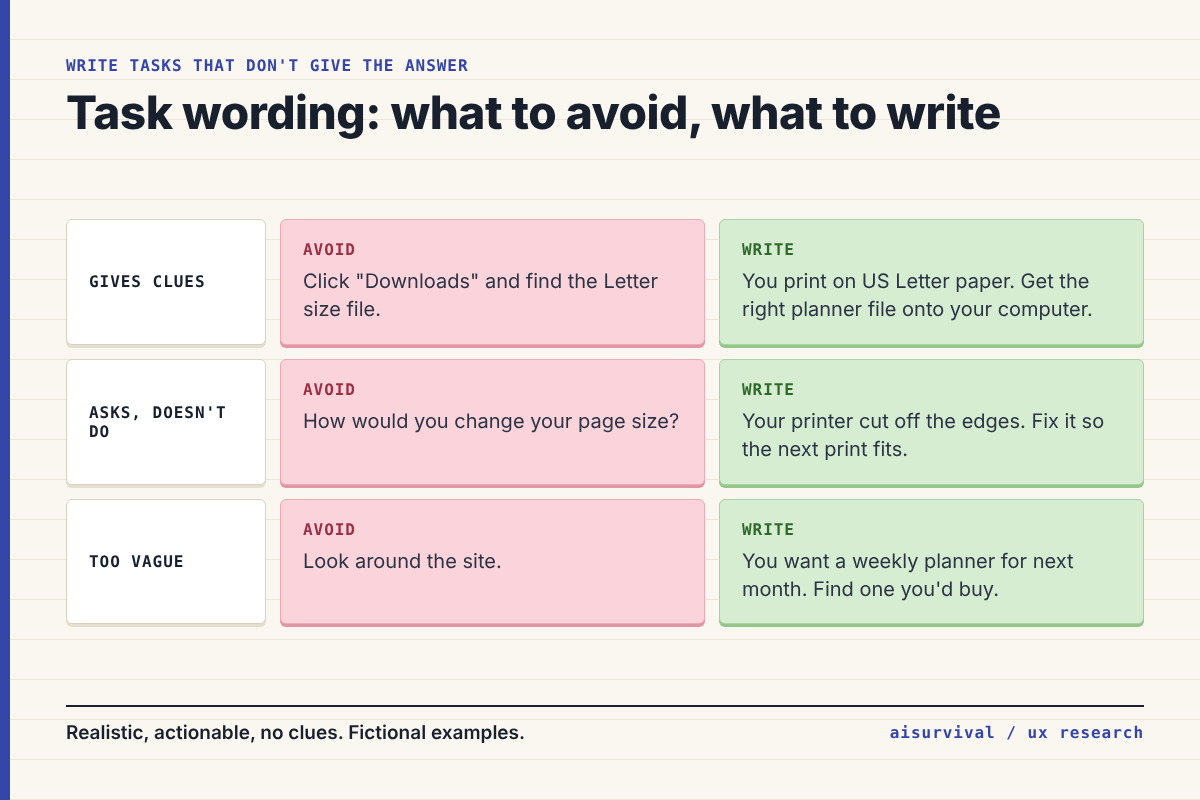
- Write three to five tasks. Each one gives a goal, not directions.
- Run the sessions. About 30 minutes each, over a video call with screen sharing. Ask permission to record. Ask people to think aloud, then mostly stay quiet. If they go silent, a gentle “What are you thinking?” is enough.
- Log and rank. Write each problem with a timestamp and how many people hit it. Fix the ones that blocked people first, then test again.
Step 3 is where most tests go wrong. NN/g’s guide to task scenarios gives three rules: make tasks realistic, make them actionable (people do it, not describe it), and don’t give clues, like the exact button name. As the guide puts it, “Avoiding clues does not mean being vague” (NN/g).
Where does AI help in usability testing, and where doesn’t it?
Short version: AI helps before and after the test. Not during.
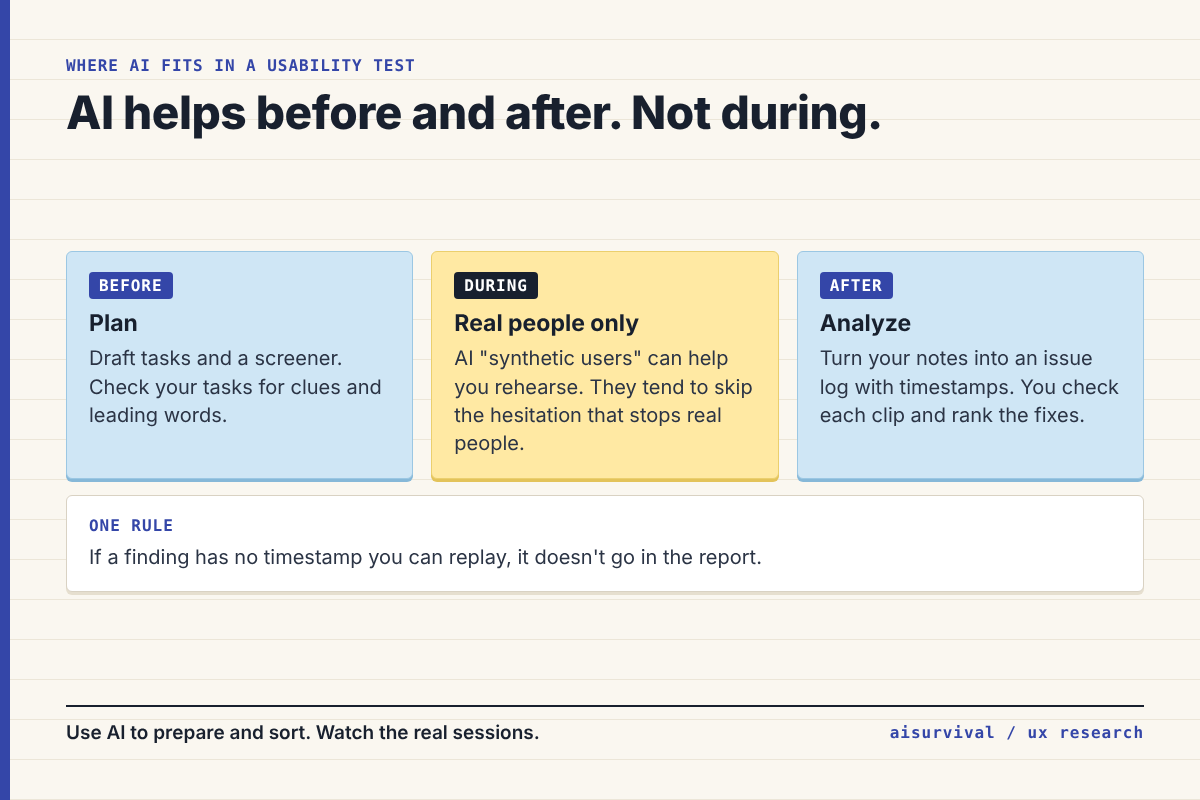
- Before: AI is good at drafting tasks and screeners, and even better at catching clues and leading words in tasks you’ve already written.
- During: there’s a lot of buzz about AI “synthetic users” that click through your design. One small 2026 experiment by Userbrain, a testing company, compared five real users with five ChatGPT-based synthetic users on the same pricing page. The synthetic users did fail the hardest task the same way real people did. But on another task, all five synthetic users got it right while only three of five real people did. The AI pushed past the hesitation that stops real people (Userbrain). Useful for a rehearsal. Not a substitute.
- After: paste your notes or transcripts and let AI turn them into an issue log. Then check every item against the recording. If it doesn’t have a timestamp you can replay, it doesn’t go in the report.
Copy-and-paste prompts
Replace anything in [brackets]. Remove names and personal details from notes before pasting them into an AI tool, and make sure your participants agreed to the recording.
Prompt 1: Draft and check your tasks
I'm planning a usability test.

Product: [what it is]
Who uses it: [short description of real users]
Decision this test should inform: [one sentence]
Screens or flows to test: [list]

1. Draft 4 task scenarios. Each one gives a realistic goal and context, not steps.
2. For each task, write what "success" looks like so I can tell if they finished.
3. Check each task for these problems and fix them:
   - uses the exact words of buttons, menus, or labels on the screen
   - asks how they WOULD do something instead of having them do it
   - is too vague to know when they're done
4. Suggest the order to give the tasks, from easy to hard.
Prompt 2: Turn session notes into an issue log
Below are my notes from [number] usability test sessions. Each note starts with a participant ID (P1, P2, ...) and a timestamp.

Make an issue log table with these columns:
Issue | Task | Participants who hit it (IDs) | Timestamps | What they did or said (short, from my notes only)

Rules:
- Only use what is in my notes. Don't add problems I didn't write down.
- If two notes describe the same problem, merge them and keep all IDs and timestamps.
- Don't rank severity. I'll do that after rewatching the clips.

Notes:
[paste notes]
Example (fictional)
Everything here is made up for illustration.
Remember the printable planner shop from the customer review guide? Its reviews pointed to page size confusion. Reviews tell you what went wrong. A usability test shows you where.
The owner recruits five past buyers from her mailing list and gives them one key task: “You print on US Letter paper. Get the right planner file onto your computer.” Four of five open the first file they see, which is A4. Two of them say out loud, “I guess this is the one.” Nobody notices the size label, because it sits under the download button in small gray text.
The fix takes ten minutes: two big buttons, “US Letter” and “A4,” plus the size in each file name. The next round of five tests that fix.
Quick checklist:
☐ You wrote down the decision this test informs.
☐ Your participants match real users.
☐ Tasks give goals, not directions or button names.
☐ You stayed quiet and didn’t help.
☐ Every issue has a timestamp you can replay.
☐ You planned the next round to test your fixes.
Limits
- Five users is a rule of thumb for qualitative tests with similar users. It’s from a 2000 article, and NN/g has published newer analysis on test sizes since then.
- Usability tests show whether people can use something, not whether they want it. Pair them with other research for that.
- Think-aloud changes how people work a little. Some people edit their thoughts before speaking.
- The synthetic user experiment we cite was small (five vs. five) and run by a testing company on its own product.
- Follow your company’s rules and local law on recording and participant consent. The planner shop example is fictional.
FAQ
How many users do you need for a usability test?
For a qualitative test with similar users, about five per round is the common rule, based on Nielsen’s 2000 model. Run several small rounds instead of one big one. Different user groups and number-based benchmarks need more people.
What is the think-aloud method?
Participants say what they’re thinking while they use the product. It shows you why people get confused, not just where. Nielsen described it in his 1993 book Usability Engineering.
What’s the difference between moderated and unmoderated testing?
In a moderated test, a facilitator is there live, in person or on a call, and can ask follow-up questions. In an unmoderated test, participants do the tasks alone in an online tool, and you review the recordings later.
Can AI replace usability testing with real users?
Not yet. AI can help you plan tasks and sort your notes, and synthetic users can help you rehearse. But in at least one small experiment, AI users pushed past the hesitation that stopped real people. Real users are still the test.
More UX research: for what to ask before you build, see how to write a customer survey with AI. For the bigger picture, see the product management process guide.
Next in UX Research Methods (one new method every Tuesday): card sorting, open vs. closed, and how to analyze the results with AI. Subscribe if you’d like it in your inbox.
Your turn: What’s the hardest part of usability testing for you: recruiting, writing tasks, or staying quiet? Tell us in the comments. Your answers shape future guides.