
What’s the best way to analyze customer reviews with AI?
For a small shop with a few hundred reviews, start free: an AI chat to draft themes, and a spreadsheet to tag and count them. Sell on Shopify? Judge.me adds AI summaries for $15/month. Have an app? Appbot starts at $49/month. Thematic is for teams with thousands of comments a year. Whatever you pick, count in rows, not in a chat summary, and check real reviews before you act.
Prices and features below were checked on the tools’ official pages on November 4, 2026. We compared them from those pages; this isn’t a hands-on test. No affiliate links.
On this page
- The 6 tools at a glance
- The five-step workflow (any tool)
- Each tool, in plain words
- Where AI review analysis goes wrong
- Copy-and-paste prompts
- Example (fictional)
- Limits
- FAQ
Which AI tool should you use to analyze reviews?
It mostly depends on two things: how many reviews you have, and where they live. A few hundred reviews you can export? Free tools are plenty. Reviews pouring in from an app store or a big store every day? That’s when a dedicated tool starts to earn its fee.
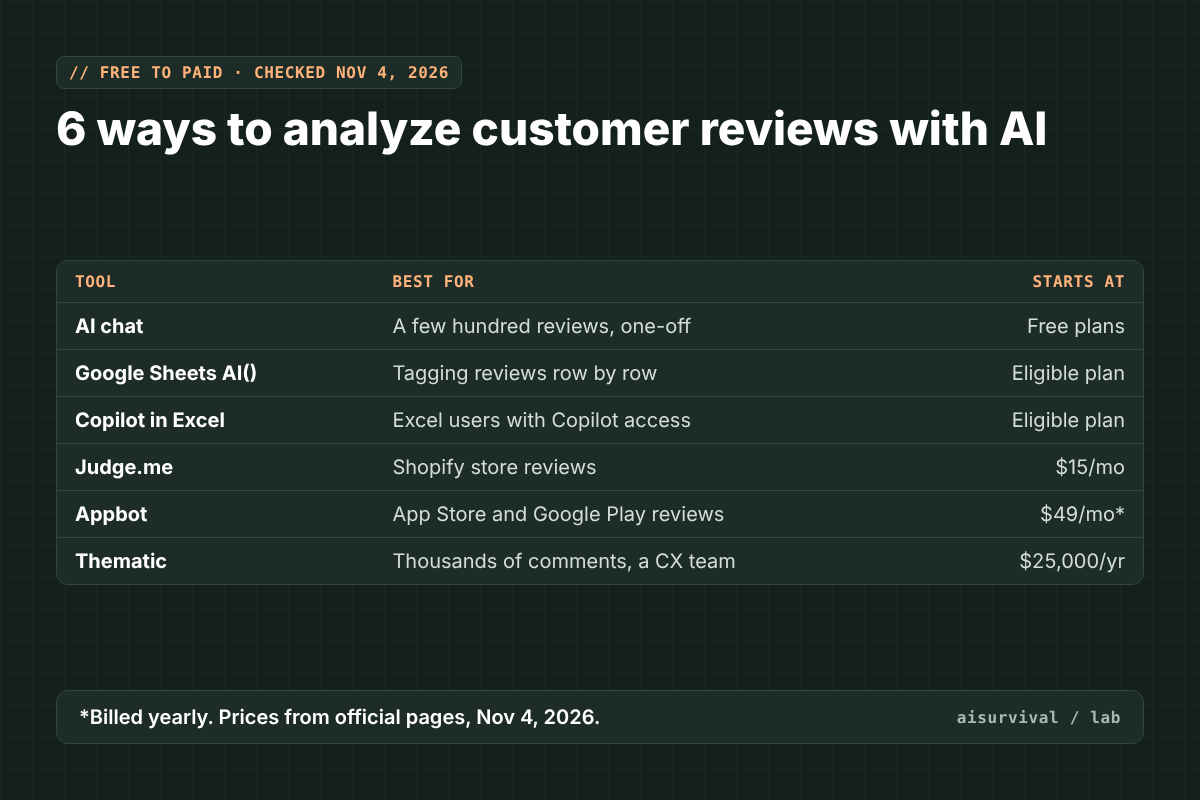
| Tool | Best for | Starts at | Watch out for |
|---|---|---|---|
| AI chat (ChatGPT, Claude, Gemini) | A one-off look at a few hundred reviews | Free plans | Invented quotes and loose counts |
| Google Sheets AI function | Tagging reviews row by row | Eligible Workspace or Google AI plan | Generates the first 350 selected cells at a time |
| Copilot in Excel | Excel users who already have Copilot | Eligible Microsoft 365 plan | The COPILOT cell function was retired Sept 14, 2026 |
| Judge.me | Shopify store reviews | $15/month (Awesome) | Shopify only; AI summaries not on the free plan |
| Appbot | App Store and Google Play reviews | $49/month billed yearly | Ask Appbot AI is on Large plans and up |
| Thematic | Thousands of comments, a CX team | $25,000/year | Built for companies, not side projects |
How do you analyze reviews with AI, step by step?
Here’s the part most tool lists skip. The tool matters less than the steps. Product teams call this voice of customer (VoC) analysis, and the core idea is simple: turn a pile of opinions into a short list of themes, with a count and a feeling attached to each.
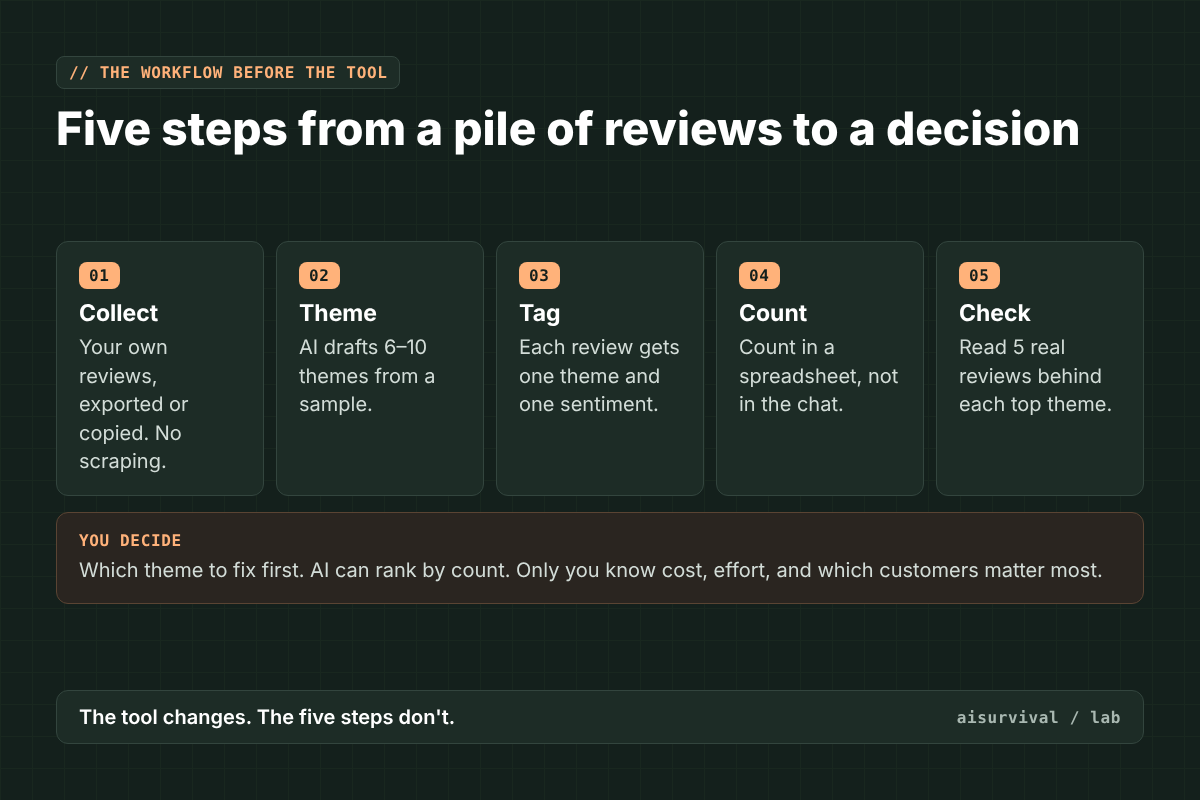
- Collect. Use reviews you have access to: your own store’s reviews, export files, or support messages. Don’t scrape sites that don’t allow it. Strip out names and emails before pasting anything into an AI tool.
- Theme. Give AI a sample (say, 50 reviews) and ask for 6 to 10 themes with a one-line definition each. You edit the list. This becomes your codebook.
- Tag. Put one review per row. Tag each with one theme and one sentiment (positive, negative, mixed).
- Count. Use COUNTIF or a pivot table. Don’t trust a chat to count for you.
- Check. Read five real reviews behind each top theme. Does the label still fit?
Thematic, one of the tools below, describes the same loop in its own guide: find recurring themes, pair each with sentiment, then share and act (Thematic). The paid tools mostly automate steps 2 to 4.
The 6 tools, in plain words
1. AI chat (ChatGPT, Claude, Gemini): free, flexible, and loose with numbers
Paste in your reviews, or upload a file if your plan allows it, and ask for themes. It’s the fastest way to get a first draft of your codebook, and every one of these chats has a free plan. The catch? Chats summarize. They round, they generalize, and sometimes they quote reviews that don’t exist. Use the chat for steps 2 and 3, and let a spreadsheet do the counting.
2. Google Sheets AI function: tag every row with a formula
Google Sheets has an AI function, =AI("prompt", range), that runs a prompt on your cells. Google lists categorizing data, including sentiment analysis, as one of its uses. That’s a great fit for step 3: one review per row, one AI formula per row, then a normal COUNTIF on the results. Two things to know: it needs an eligible Google Workspace or Google AI plan, and it generates the first 350 selected cells at a time (Google Docs Editors Help).
3. Copilot in Excel: for people who already live in Excel
If you have Copilot in Excel, you can ask it in the Copilot pane to summarize or classify a column of reviews. Microsoft lists several eligible plans, including Microsoft 365 Premium and a Personal or Family subscription with an AI credits plan (Microsoft Support). Heads-up: older guides show a =COPILOT() cell formula. Microsoft says that function is no longer available as of September 14, 2026 (Microsoft Support).
4. Judge.me: AI summaries for Shopify store reviews
Judge.me is a review app for Shopify. Its paid Awesome plan, $15/month, includes AI review summaries, AI reply drafts, translations, and sentiment and topic tags (product, store, delivery, price, returns). The free plan doesn’t include the summaries (Judge.me). It’s handy if you’re already on Shopify. Just remember a summary isn’t a count: export the reviews now and then and run steps 3 to 5 yourself.
5. Appbot: built for app store reviews
Building an app on the side? Appbot pulls reviews from the App Store, Google Play, and Microsoft’s store. Sentiment and topics are on every plan. The Small plan is $49/month billed yearly ($59 month to month), and there’s a 14-day free trial with no credit card. Ask Appbot, its plain-English AI analysis, is on the Large plan and up (Appbot).
6. Thematic: when feedback is a full-time job
Thematic finds themes and sentiment across large volumes of feedback. Its Foundation plan is $25,000 a year for up to 25,000 comments across up to three datasets. Enterprise pricing is custom (Thematic). That’s not a side-hustle tool. It’s on this list so you can see where the ladder ends, and why the free workflow above is worth learning first.
Where does AI review analysis go wrong?
Four mistakes show up again and again. Each one has a simple fix.
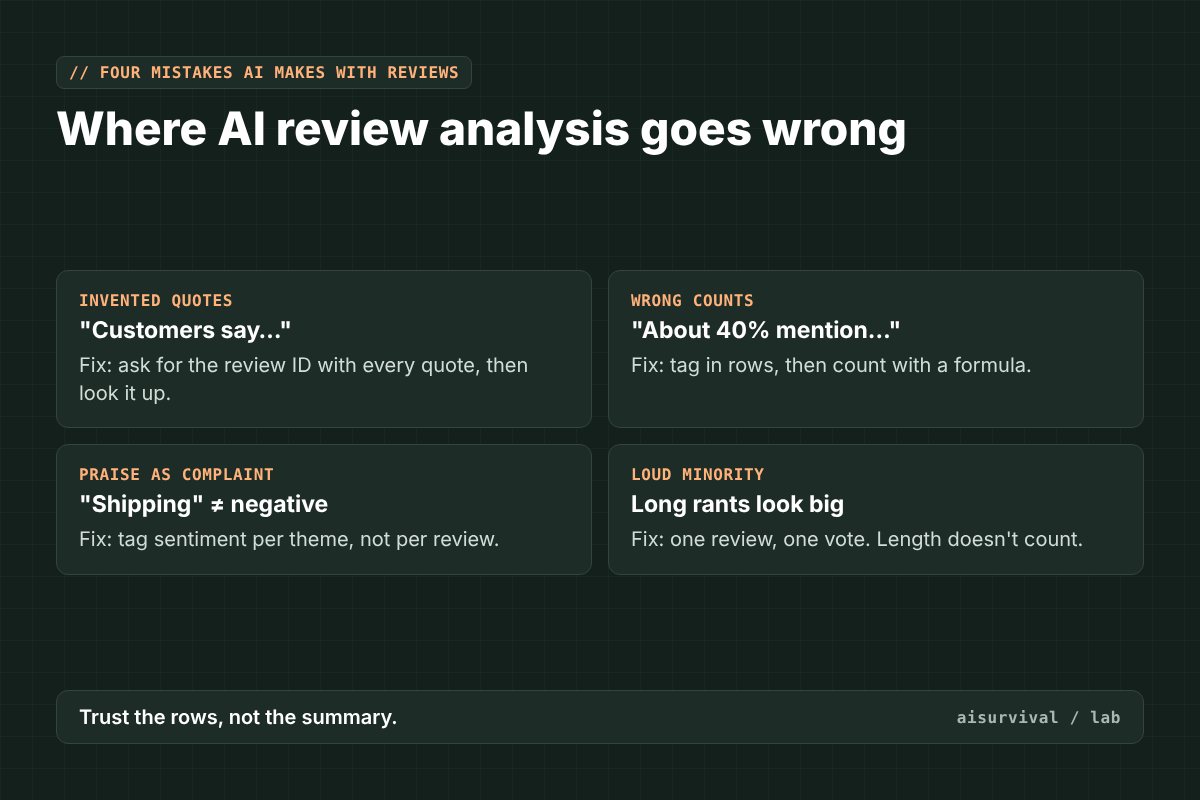
- Invented quotes. Give every review an ID, and ask the AI to cite the ID with every quote. Then look it up.
- Wrong counts. “About 40% mention shipping” is a guess. Tag in rows, count with a formula.
- Praise counted as a complaint. “Shipping was fast!” mentions shipping but isn’t a problem. Tag sentiment per theme, not just per review.
- Loud minority. One long rant can feel bigger than ten short notes. One review, one vote.
Copy-and-paste prompts
How to use these:
- Remove customer names, emails, and order numbers first.
- Number your reviews (R1, R2, R3…) so quotes can be checked.
- Run Prompt 1 on a sample, edit the themes, then run Prompt 2 on everything.
Prompt 1: Draft a theme codebook
Below are [number] customer reviews for [product or shop], each with an ID (R1, R2, …).

1. Suggest 6 to 10 themes that cover most of these reviews.
2. For each theme, write a one-line definition and list 2 example review IDs.
3. Add an "Other" theme for anything that doesn't fit.
4. Don't count or estimate percentages. I'll count later.
5. Only quote text that appears in the reviews, and always include the review ID.

Reviews:
[paste reviews with IDs]
Prompt 2: Tag each review (for a table or spreadsheet)
Use only these themes: [paste your edited theme list with definitions].

For each review below, return one row with:
ID | main theme | sentiment for that theme (positive, negative, mixed) | a short exact quote from the review

Rules:
- One main theme per review. If none fits, use "Other."
- "Mentions shipping" is not the same as "complains about shipping." Judge sentiment for the theme.
- Don't summarize or count. Just return the rows.

Reviews:
[paste reviews with IDs]
Tip: Paste the rows into a spreadsheet and count with COUNTIFS. In Google Sheets, you can also put a version of Prompt 2 inside the AI function, one row at a time.
Example (fictional)
Everything here is made up for illustration.
Picture a small shop selling printable planners, with 120 reviews. The AI chat drafts eight themes. The owner merges them into five, tags every review in a sheet, and counts.
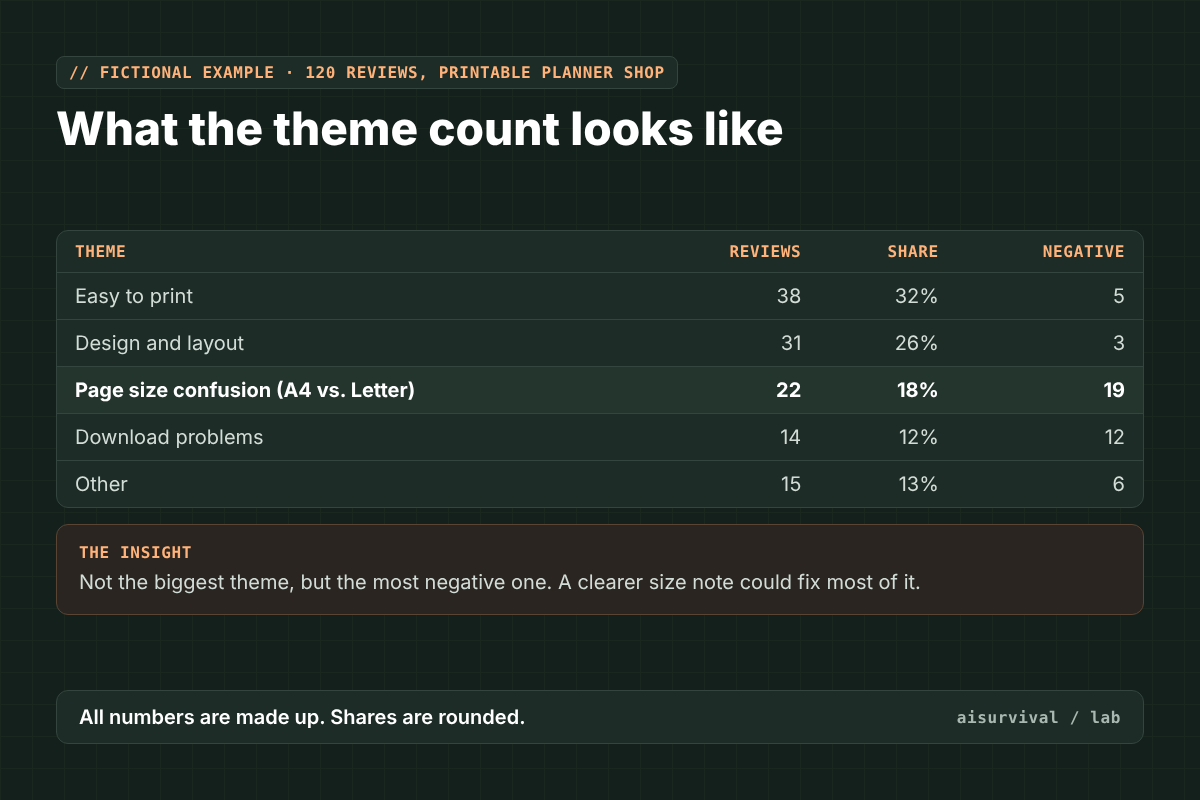
“Easy to print” is the biggest theme, and it’s mostly happy. The one that matters is “page size confusion”: 22 reviews, 19 of them negative. A chat summary would probably lead with the biggest theme. The count points to the fix: a clear A4 vs. Letter note on the listing and in the file name.
Quick checklist:
☐ You only used reviews you’re allowed to use.
☐ Names and emails were removed before pasting.
☐ Every quote has a review ID you can look up.
☐ Counts come from a formula, not a chat.
☐ You read real reviews behind each top theme.
Limits
- We compared these tools from their official pages on November 4, 2026. We didn’t run the same reviews through each one. Prices and plans change, so check before you buy.
- Reviews come from people who chose to write one. They show what bothers vocal customers, not everyone.
- Check each platform’s terms before exporting or reusing reviews, and each AI tool’s privacy settings before pasting customer text.
- The planner shop example and its numbers are fictional.
FAQ
Can ChatGPT analyze customer reviews?
Yes, for drafting themes and tagging reviews. It’s less reliable for counting and quoting, so give every review an ID, ask for IDs with every quote, and do the counting in a spreadsheet.
What is the cheapest way to analyze reviews with AI?
A free AI chat plan plus a free spreadsheet. Use the chat to draft themes and tag reviews, and the spreadsheet to count. Paid tools mostly save time once you have a lot of reviews.
What is sentiment analysis of reviews?
It means labeling how a customer feels, usually positive, negative, or mixed. It’s most useful per theme: a review can be happy about the design and unhappy about the download.
Is it OK to scrape competitors’ reviews for analysis?
Many sites don’t allow scraping in their terms. Stick to your own reviews and exports, or read competitors’ public reviews by hand and take notes. When in doubt, check the site’s terms.
Part of the AI tools series. Previous: How to Make a Customer Survey With AI: 5 Tools Compared. Reviews tell you what people say on their own. A well-written survey lets you ask what you need to know.
Next in this series: AI note-takers for customer interviews, five tools and their privacy rules. Subscribe if you’d like it in your inbox.
Your turn: Where do your reviews live, and what’s the hardest part of making sense of them? Tell us in the comments. Your answers shape future guides.