
QUICK ANSWER
Current product planning looks after products that are already selling, this year and next (Y to Y+1). You’re not guessing about the future here. You have reviews, support emails, sales, and usage data. The work runs as a loop: find the product’s life cycle stage, listen to customers, rank the fixes, ship and measure, trim cost, then launch and sell again. AI is fast at sorting a pile of feedback. It’s just as fast at miscounting it, so check the numbers before you act on them.
Where this sits on the map: Current planning track (Y to Y+1) · Track hub. This page is the table of contents for every current planning guide in the product planning process series.
On this page
- What current planning covers
- The six-step loop
- Copy-and-paste prompt: feedback sorter
- Worked example (fictional)
- Guides in this track
- Limits
- FAQ
What current planning covers
Advanced planning asks what to build two or three years from now. Current planning asks a plainer question: how do you make the product you’re already selling better, and more profitable, while it’s still on the shelf?
That covers a lot of ground. Fixing what customers complain about. Deciding which fixes come first. Cutting cost without cutting quality. Retiring the parts nobody uses. Pricing, launch plans, and the material your sales and support people work from.
A quick naming note, because it trips people up when they search. “Product lifecycle management” usually means PLM software, the engineering systems that track drawings, parts lists, and design changes. The commercial side, managing a product’s sales and costs over its life, is a separate idea (Wikipedia). This guide is about the commercial side.
You’d think having real data makes this track the easy one. It doesn’t. Feedback arrives messy. A few loud customers can drown out hundreds of quiet ones. And an AI tool will turn 160 reviews into a tidy chart in seconds, with numbers that don’t match the reviews.
The six-step loop
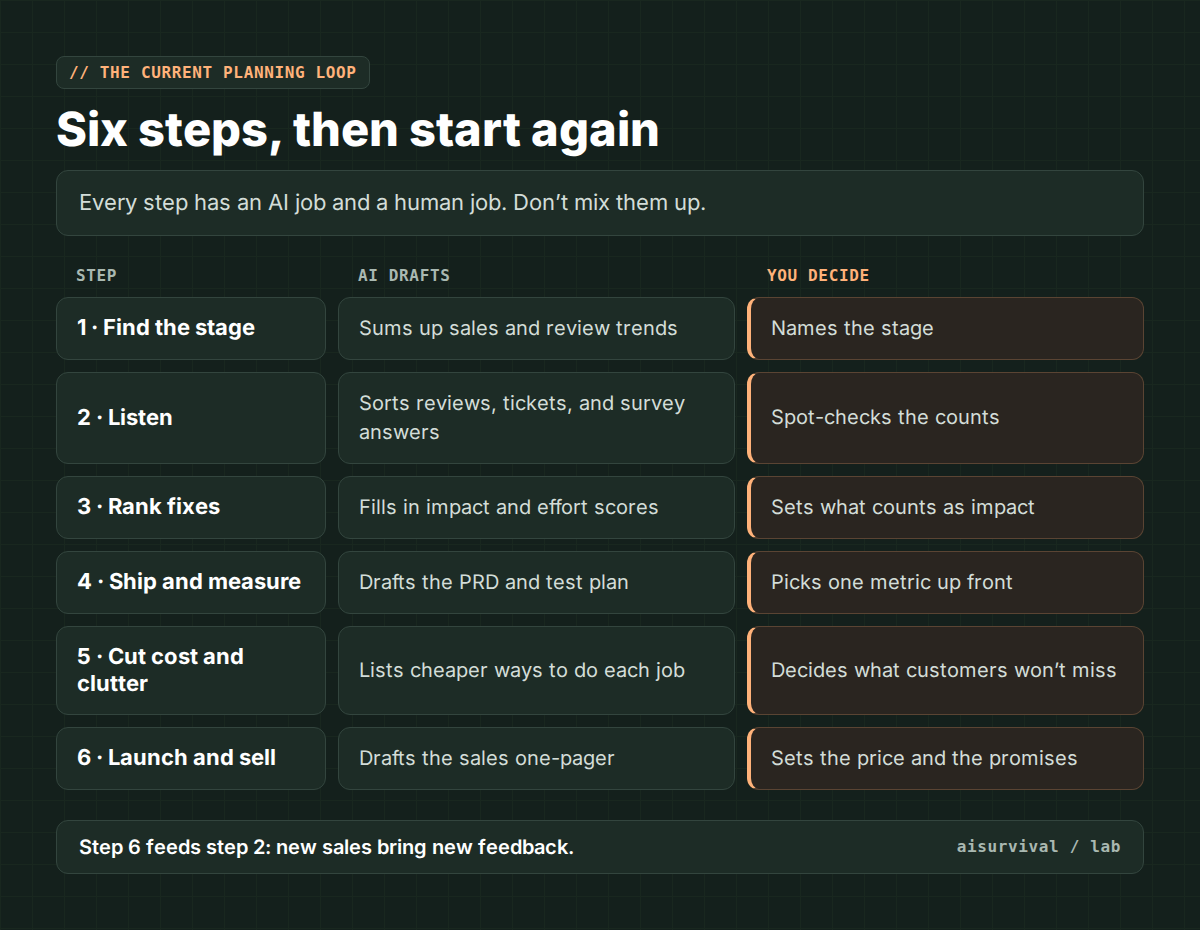
Step 1: Find the product’s life cycle stage
Most products move through four stages: introduction, growth, maturity, and decline. In maturity, sales growth levels off and keeping loyal customers matters most. In decline, sales and profit fall, and one common move is to “harvest” the product: spend less on marketing and keep selling it as long as it pays (CFI).
Why start here? Because the stage decides what kind of work is worth doing. Adding features to a product in decline is usually money you won’t get back. Cutting cost on a product that’s still growing fast can choke it.
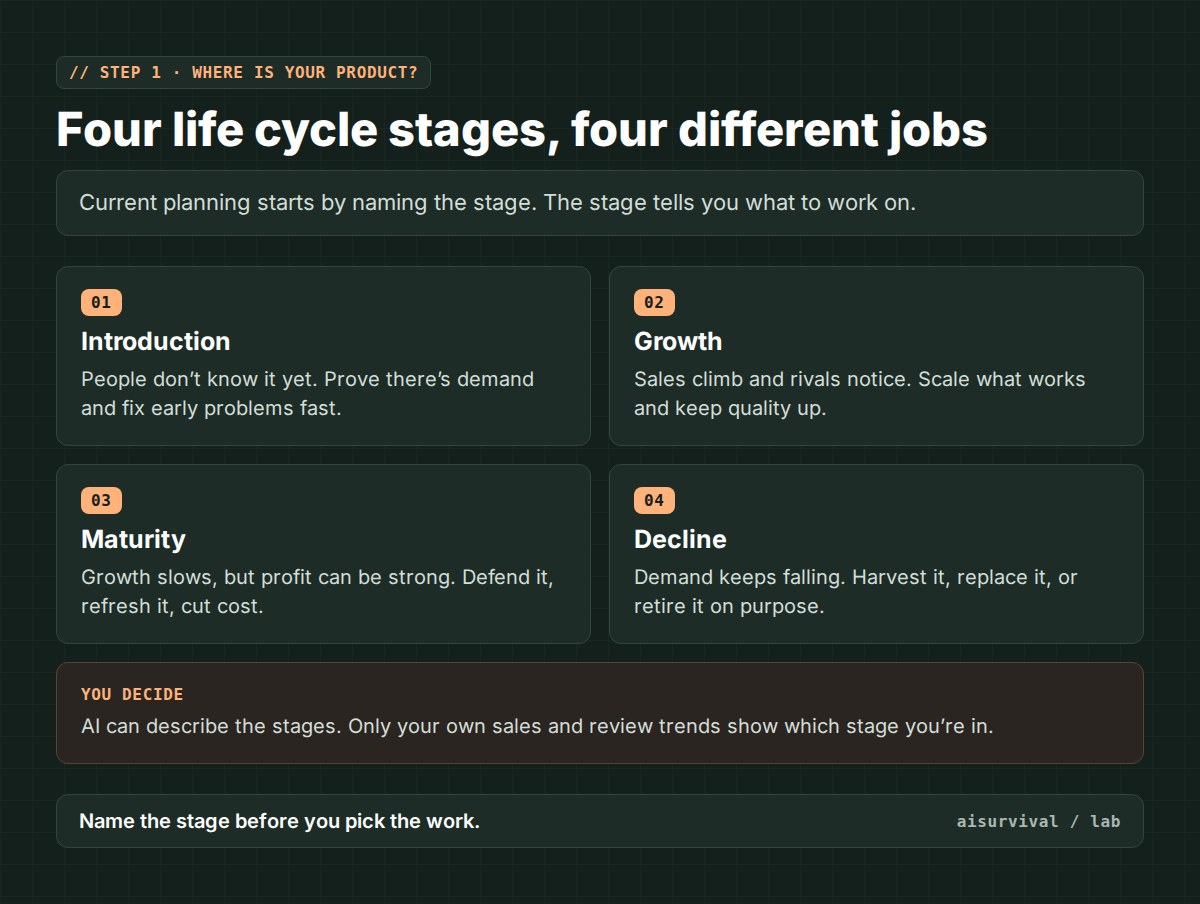
Large company: planners track each model’s sales, margin, and market share by quarter and agree on the stage with sales and finance.
Small seller: chart the last 12 months of orders by month. Rising, flat, or falling? That’s a good enough first read.
Step 2: Listen to the customers you already have
Pull everything customers have told you: reviews, support emails, return reasons, survey answers. Teams often call this the voice of the customer (VoC). If you need fresh answers, a short survey helps, and this guide shows how to write one with AI without leading questions.
Many companies also track the Net Promoter Score (NPS). Customers answer one question on a 0 to 10 scale: how likely are they to recommend you? People who answer 9 or 10 are promoters, 0 to 6 are detractors, and the score is the percentage of promoters minus the percentage of detractors (SurveyMonkey). The score tells you something moved. The comments next to it tell you what to fix.
This is where AI earns its keep. Sorting 500 comments by hand takes a day. A chatbot does it in a minute. It also makes three mistakes often enough that you should look for them every time: it counts praise as a complaint (“no leaks at all” gets filed under leaks), it blends two customers into one tidy quote, and it sometimes quotes words nobody wrote.
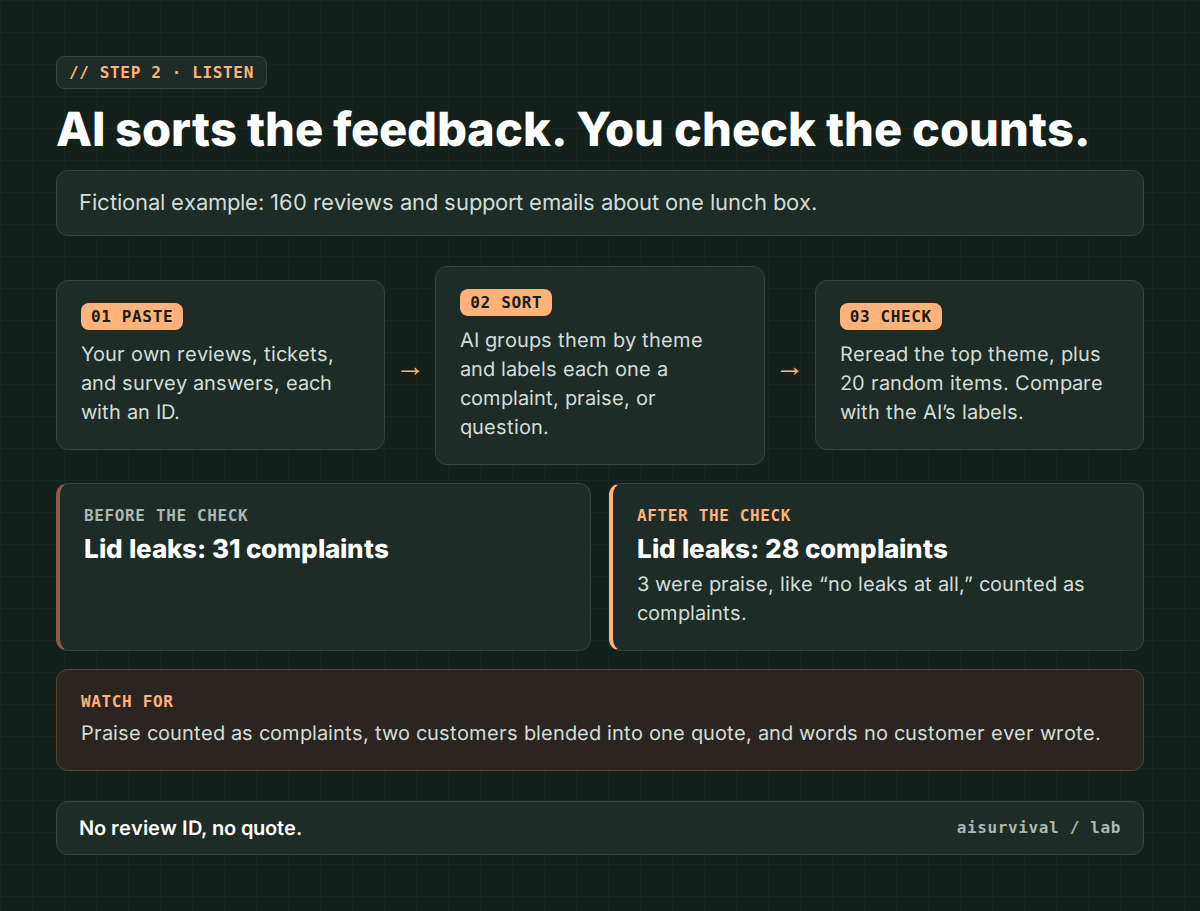
Use your own data, or public reviews you copy by hand. Don’t scrape sites behind a login, and don’t paste customers’ names or emails into an AI tool.
Large company: support tickets, NPS surveys, app store reviews, and usage logs feed a monthly pain point report.
Small seller: copy your last 100 reviews and support emails into one document, give each an ID, and sort them once a quarter.
Step 3: Rank the fixes
You’ll end up with more problems than time. An impact vs. effort sheet is the simplest way to choose: score each fix on how much it helps and how much work it takes, then start with big help and small work.
Write down what “impact” means before anyone scores anything. Something like “how many customers it touches, times how much it bothers them.” Skip that, and AI will hand you confident scores built on a rule nobody agreed to.
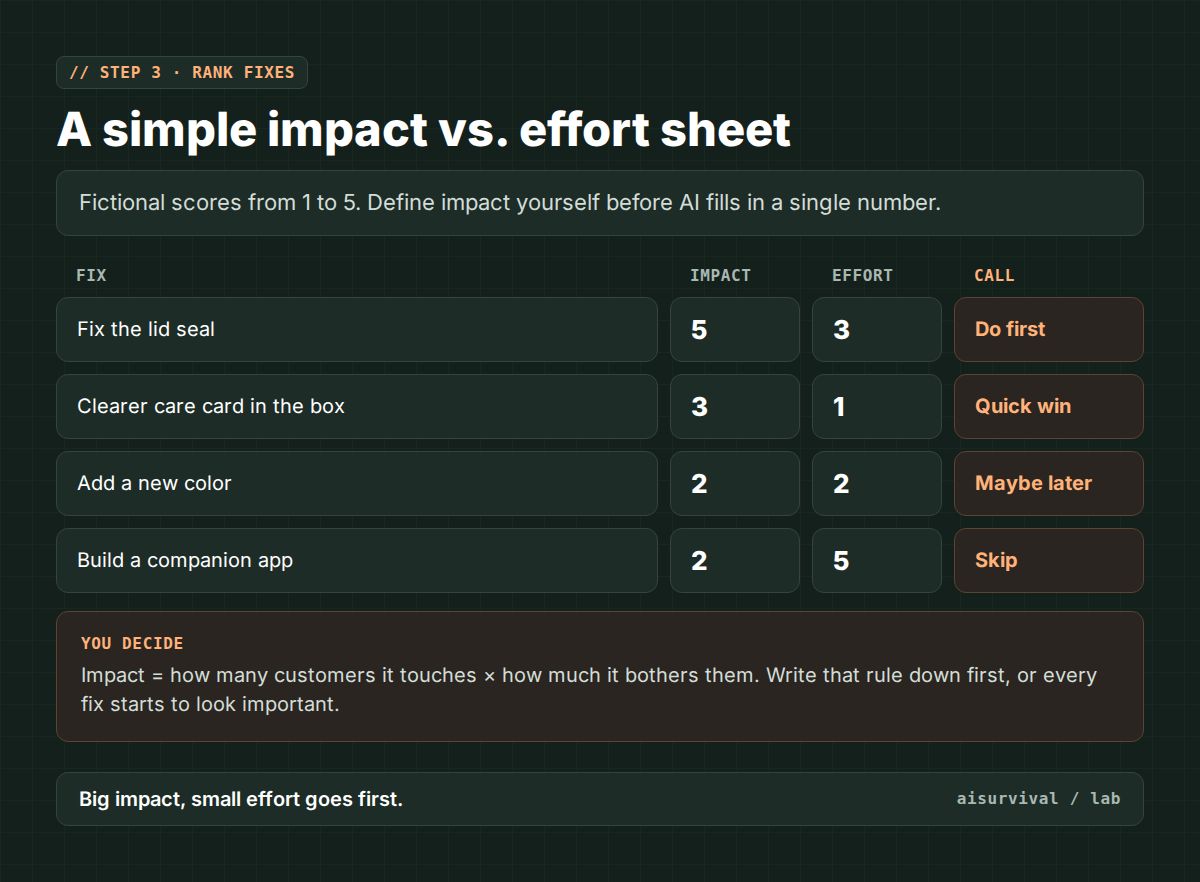
Large company: scoring sessions with engineering, design, and quality, tied to the quarterly release plan.
Small seller: a list of five fixes, scored 1 to 5, redone whenever a new complaint shows up more than a few times.
Step 4: Ship the change and measure it
Before anything gets built, write a short product requirements document (PRD): what’s changing, who it’s for, and how you’ll know it worked. AI drafts these well. The “how you’ll know” line is yours to write.
Online, the cleanest way to check a change is an A/B test: two versions shown to different customers at the same time. Pick the metric, the test length, and the sample size before you start, and don’t stop the test the moment your favorite version pulls ahead. Stopping early is a classic way to crown a winner that was just luck (Mida).
Large company: a PRD reviewed with engineering and design, then A/B tests and post-launch tracking of conversion and time spent.
Small seller: you probably don’t have enough traffic for a real A/B test. Compare a fixed window before and after the change instead, and write down anything else that changed at the same time.
Step 5: Cut cost and clutter
Mature products are where cost work pays off. The classic method is value engineering, often paired with value analysis (VAVE). You list what each part of the product actually does, its function, then look for a cheaper way to do that same job. It isn’t meant to be plain cost-cutting. The point is to keep the functions customers need at a lower total cost (WBDG).
The other half is retiring things on purpose. End of life (EOL) is the planned exit of a feature, a model, or a whole product. If nobody can name a customer who’d miss it, it’s a candidate. Give people notice, and tell them what to use instead.
Large company: cost-down projects with engineering and purchasing, plus a yearly lineup review that retires low-margin models.
Small seller: look at your packaging, your shipping, and your slowest-selling variant first. That’s usually where the easy savings are.
Step 6: Launch and sell
An improved product still needs a go-to-market (GTM) plan: who it’s for, what it costs, where it’s sold, and what you’ll say about it. Then a one-page summary for whoever sells or supports it, so they can answer “what’s new?” without guessing.
Only promise what you’ve measured. “New leak-proof seal” belongs on the listing after step 4 shows fewer leaks, not before.
New sales bring new reviews, and you’re back at step 2.
Large company: launch plans agreed with marketing, sales, and support, plus sales training material and early-response tracking.
Small seller: update the listing, your FAQ, and your saved replies to customer messages on the same day.
Copy-and-paste prompt: feedback sorter
This prompt sorts customer feedback into themes and makes the AI show its work, so you can catch miscounts. To use it:
- Collect your feedback in one document. Remove names, emails, and order numbers.
- Give each item an ID, like R1, R2 for reviews and E1, E2 for emails.
- Copy the prompt in the gray box into ChatGPT, Claude, Gemini, or whichever AI chat you use. Fill in the brackets and paste your feedback at the end.
- Reread the biggest theme yourself, item by item, using the IDs the AI lists.
- Fix the counts before they go into your scoring sheet.
Tip: if a quote in the answer doesn’t match the item with that ID word for word, throw out that whole theme and run it again.
Prompt: Feedback sorter (fill in the brackets)
I am sorting customer feedback for a product that is already on sale.

Product: [e.g., stainless steel lunch box]
Feedback: [paste at the end. Each item has an ID like R1, R2, E1.]

Do this:
1. Label each item COMPLAINT, PRAISE, QUESTION, or MIXED. If an item praises something (for example "no leaks at all"), label it PRAISE, even if it contains a problem word.
2. Group the complaints into themes. For each theme, give a short name, the count, and the full list of item IDs.
3. For each theme, quote one item word for word, with its ID. Never combine two items into one quote. Never reword a quote.
4. List any items you were unsure about, and why.
5. Do not suggest fixes yet. Do not guess how many customers outside this list feel the same way.

Feedback:
[paste here]
Worked example (fictional data)
Everything in this example is made up for illustration. The shop, the numbers, and the results aren’t from a real project.
Fictional shop: the same two-person online store from the advanced planning hub. This time the focus is its best seller, a steel lunch box that’s been on sale for two years.
| Step | Fictional finding | What the human decided |
|---|---|---|
| 1. Stage | Monthly orders have been flat for a year. | Called it maturity. Focus on defending and cost, not new features. |
| 2. Listen | AI sorted 160 reviews and emails. Top theme: lid leaks, 31 complaints. | Reread all 31. Three were praise. Real count: 28. |
| 3. Rank | Lid seal: impact 5, effort 3. Companion app: impact 2, effort 5. | Seal first. App dropped. |
| 4. Measure | Too few orders for an A/B test. | Tracked leak complaints per 100 orders for eight weeks before and after. |
| 5. Cost | AI suggested a cheaper plastic for the lid. | Said no: the lid is the top complaint. Switched the gift box insert to plain card instead, and retired the slowest-selling color. |
| 6. Sell | New listing copy drafted by AI. | Held “improved seal” until the eight-week check came back. |
Step 5 is the one to notice. The AI’s cost idea was reasonable on paper and wrong for this product, because it pointed straight at the part customers already complain about. Nothing in a cost list tells you that. Step 2 does.
Quick checklist before you act:
☐ You know the product’s stage, and why.
☐ Every count from AI was checked against the original items.
☐ “Impact” was defined before scoring.
☐ The success metric was picked before the change shipped.
☐ Cost cuts don’t touch the parts customers complain about.
☐ Nothing goes on the listing until it’s measured.
Guides in this track
One guide is out already. The rest go up over the coming weeks, and links get added here as they’re published.
- How to write a customer survey with AI (without leading questions)
- Product usage data for planners: what to look at first
- Usability tests and customer interviews for a product you already sell
- Voice of customer analysis with AI: from reviews, tickets, and NPS to top pain points
- Current-state journey maps and personas, updated from real feedback
- How to prioritize product fixes: an impact vs. effort scoring sheet
- How to write a product requirements document (PRD) with AI
- How to plan an A/B test with AI, and what to measure after launch
- Value engineering (VAVE) for product planners
- When to kill a feature or a model: an end-of-life checklist
- How to price a product with the Van Westendorp method
- A go-to-market plan and sales one-pager with AI
- NPS vs. CSAT vs. CES: which customer metric to track
- Customer touchpoint audit and churn prevention with AI
- Next year’s product plan: milestones, quarterly releases, and resources
Planning further ahead? The advanced planning hub covers the two-to-three-year track.
Limits
- Life cycle stages are a model, not a law. Some products jump stages or come back after a redesign.
- Feedback isn’t a fair sample. Unhappy customers write more, and quiet customers leave without saying why.
- Any count or quote from AI is unverified until you’ve checked it against the original items.
- Before-and-after comparisons are weaker than A/B tests. Seasons, promotions, and price changes can move the numbers too.
- How big companies split this work varies a lot by industry. This is one common setup, not a standard.
- Don’t paste customer personal data or confidential company data into an AI tool unless you’re allowed to.
FAQ
What is current product planning?
The part of product planning that manages products already on the market, this year and next. It covers customer feedback, fixes, cost, retiring old models, pricing, and launches.
Is this the same as product lifecycle management (PLM)?
Not quite. PLM usually refers to engineering software that manages product data like drawings and parts lists. Current planning is the business side: what to fix, what to cut, and how to sell.
How do I know which life cycle stage my product is in?
Start with sales over the last 12 months. Fast rise suggests growth, flat suggests maturity, and a steady fall suggests decline. Check it against margins and reviews before you commit.
Can AI analyze customer reviews for me?
It can sort and summarize them quickly. It can’t be trusted to count them. Give every review an ID, ask for the IDs behind each theme, and reread the biggest theme yourself.
Where this fits: This is the current planning track hub of the product planning process series.
Next in the series: the advanced track picks up with researching customers you don’t have yet. This track’s next guide covers product usage data: what to look at first.
Your turn: What’s the hardest part of managing a product that’s already selling? Making sense of feedback, choosing which fix comes first, or knowing when to retire something? Leave a comment. We read them, and they shape what we write next.